
LimeSurvey
Ideal for professional surveys,
questionnaires, and forms
In short
LimeSurvey is an open source survey platform designed for creating, deploying, and analyzing sophisticated online questionnaires. Unlike SurveyMonkey, Google Forms, and Microsoft Forms, which primarily emphasize simplicity and tightly integrated SaaS ecosystems, LimeSurvey distinguishes itself through its depth, flexibility, and full control over data. It can be self-hosted or used via managed services, making it particularly attractive to organizations with strict data protection and compliance requirements.
LimeSurvey has been in active development for over two decades and is trusted globally as a powerful, feature-rich survey solution. It serves enterprises, universities, and students alike, combining ease of use with professional-grade functionality, extensive customization capabilities, and a strong emphasis on data ownership and methodological rigor.
eQTeam leverages fully featured LimeSurvey Community Edition (CE) as a robust and versatile forms platform to efficiently capture high-quality, structured data, which is then seamlessly integrated into our wiki solutions. Over the years, we have accumulated extensive experience in designing and implementing sophisticated questionnaires.

Why LimeSurvey?
LimeSurvey is a leading open-source online survey tool that allows users to create, publish, and collect data from sophisticated questionnaires. Unlike standard form builders, it is a self-hosted or cloud-based solution designed specifically for professional research, offering complete control over data and design.
Uniquely powerful vs. competitors
While tools like SurveyMonkey, Google Forms, and Microsoft Forms focus on quick, simple polls, LimeSurvey stands out as a “classical”, scientific research engine.
- Ownership & Privacy
Unlike Google or Microsoft Forms where data lives on big-tech servers, LimeSurvey allows for self-hosting. This grants you total data sovereignty—critical for GDPR compliance and sensitive scientific research.
- Unlimited Freedom
Where SurveyMonkey often paywalls advanced features or response limits, LimeSurvey’s open-source model allows for unlimited surveys, questions, and responses without a subscription.
- Scientific Depth
It supports complex statistical workflows (exporting directly to SPSS, R, or Stata) and advanced question logic that simple form builders cannot handle.
A solid and flexible choice
LimeSurvey has been a staple of the research community for over two decades (originally launched as PHPSurveyor in 2003). Its longevity reflects both its reliability and the strength of its global developer community. The platform is used by a large and diverse worldwide user base, applying it across a wide range of use cases.
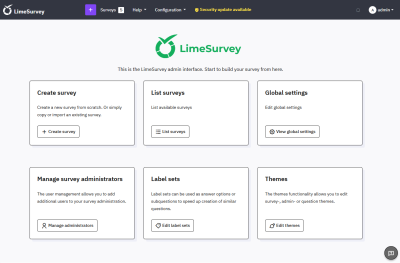
Due to its extensive flexibility, LimeSurvey can be overwhelming for new users. To address this, a comprehensive revision of the user interface is planned for 2026, with the goal of delivering a more intuitive and easier-to-use survey editor.
Key features
- 28+ Question Types
There are over 28 question types, ranging from simple text inputs to complex arrays and semantic differentials. These include file-upload questions with comment fields, as well as location-based questions enabled by mouse selection or finger press on an interactive geographic map.
- Advanced Logic
Made possible by sophisticated branching, skip logic, and piping capabilities.
- Strict Anonymity when needed
Features to disconnect participant tokens from responses, ensuring true anonymity for sensitive feedback.
- Customization & branding
Custom fonts and colors can be applied to match brand identity incl. brand logo. Custom urls and personalized icons allow for unique designs.
- Multilingual Support
Built-in translation tools for creating a single survey in 80+ languages. Even one and the same survey can be presented in different languages.
Who is it for?
LimeSurvey is the tool of choice for enterprises, universities, and students who need more than just a quick poll. It balances feature richness with ease of use, providing a professional-grade platform that prioritizes anonymity and scientific rigor.
Contact us for LimeSurvey
In the Netherlands, we are one of only few professional LimeSurvey builders. If you would like to know more about the services that we supply, please submit our contact form and we will respond within 24 hours.
For other questions or remarks, please click here and use this form.
All LimeSurvey CE features
For our projects, we use the open-source LimeSurvey Community Edition, installed on a Linux server. Below a complete list of the features available in this version is presented.
Compared with the most advanced Corporate edition offered by LimeSurvey GmbH, the core software features are identical. The Corporate plan, however, includes additional enterprise-grade infrastructure, enhanced support options, large-scale deployment capabilities, identity and access integrations, and defined operational service guarantees.
For most organizations and teams, the Community Edition, preferably deployed on a robust Linux server, fully meets functional and operational requirements. It provides the full range of features as the Corporate edition without “locked” modules, meaning you have complete control over your surveys and data.
The features can be categorized into the following logical groups.
Survey Design & Logic
- 28+ Question Types
Includes basic types (multiple choice, text, dropdowns) and advanced types (arrays, ranking, file uploads, and sliders). - ExpressionScript
An advanced logic engine that allows for complex branching, piping (carrying answers forward), and mathematical calculations within the survey. - Question Groups
Allows you to organize questions into logical sections or pages to improve participant experience. - Quotas
Sets limits on how many respondents can belong to certain categories (e.g., stopping the survey once 50 males have responded). - Assessments
Enables you to assign “scores” to answers, allowing the survey to function as a quiz or test with a final score provided to the user.
Participant & Distribution Management
- Central Participant Database (CPDB)
A centralized system to manage respondent data across multiple surveys, allowing you to track participation history. - Token Management
Uses unique “tokens” or access codes to create private, invitation-only surveys and track which specific individuals have responded. - Public Registration
Allows users to register themselves for a survey and receive an invitation link automatically. - Email Templates
Customizable templates for invitations, reminders, and confirmation emails, including automated scheduling. - Bounce Tracking
A system to track and manage failed email deliveries to keep your participant lists clean.
Appearance & Customization
- Theme Editor (Twig Engine)
A powerful templating system that allows users to fully customize the look and feel of surveys using HTML and CSS. - Label Sets
Reusable lists of answer options (like countries or scales) that can be applied to different questions quickly. - Multilingual Support
Supports over 80 languages; you can create a single survey that offers multiple languages to the respondent. - White-labeling
Since it is open source, you can remove all LimeSurvey branding and use your own logos and URLs.
Data Analysis & Export
- Real-time Statistics
Built-in dashboard for viewing basic charts, graphs, and summary statistics as responses come in. - Advanced Export Formats
Supports exporting raw data to SPSS, R, Microsoft Excel, CSV, PDF, and XML. - Partial Responses
Allows you to view and analyze data from participants who started the survey but did not finish (if enabled). - Data Encryption
Features to encrypt specific database fields to ensure high-level security for sensitive participant data.
Administration & Extensibility
- User Management & Permissions
Granular control over “who can do what,” allowing you to assign specific surveys or administrative rights to different users. - Plugin System
Unlike the Cloud version, the Community Edition allows you to install third-party plugins to extend functionality (e.g., custom payment gateways or CRM integrations). - RemoteControl API
Provides RPC/REST APIs to programmatically manage surveys, participants, and data from external applications. - Survey Groups
Functional grouping for administrators to manage large numbers of surveys more efficiently.
Technical & Privacy
- Self-Hosting
Complete ownership of the software and database on your own servers, which is ideal for strict GDPR or data privacy requirements. - GDPR Tools
Includes built-in features for data policy notices and easy deletion of participant data to remain compliant with privacy laws. - ComfortUpdate
A tool (available with a subscription) that simplifies the process of updating your self-hosted installation to the latest version.